Do the thing you sat down to do.

Distraction is everywhere. Focus is hard. NowNow works with you to keep your must-dos and wanna-dos from becoming overdue and never-done.

hyper-habituation noun The rapid loss of attentional response to reminders, systems and visual cues, caused by repeated, unchanging stimuli.

You know how easy it is to lose focus.

When your attention gets pulled in the wrong direction, NowNow helps you remember what you set out to do.

What you meant to do stays in sight.

Post-it notes are passive. Even the bright yellow ones fade into the background with time. NowNow is active and follows the rhythms you set to resist the fading effect.

You keep noticing it.

The way NowNow reminds you keeps changing, so unlike a Post-it note, what you actually want to do resists fading into the background.

Drifting off happens to everyone.

But some of us drift more than others. NowNow was built to help keep the direction of our drifting always forward.

NowNow combines clarity with clever strategies to help you stay on track and stay true to your intentions.
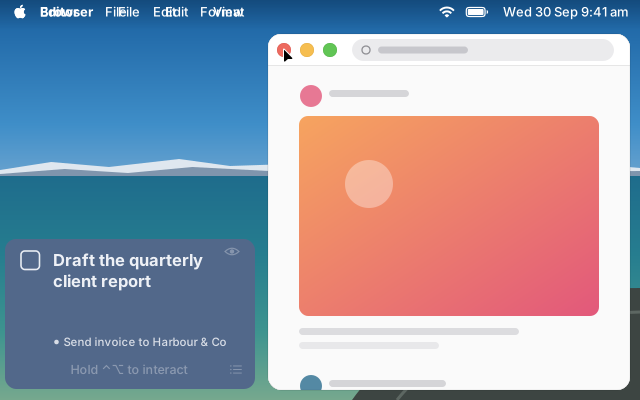
A feed fills the Mac screen. The NowNow window in the bottom-left corner shows the task, briefly shows a cat photo, then the task again. The pointer closes the feed, and a half-written report is underneath.

You don’t need another to-do list. But you might like a task completion assistant.
Make steady progress on the work that matters.

NowNow adapts to how you want to work, task by task, from short blocks to long sessions of deep work.

Different tasks need different kinds of time.

A single timer for everything cuts you off when you’re in the flow, and having no limit makes hard tasks easy to put off.

Give hard tasks a short block with a clear end.

Knowing when you can stop makes it easier to begin.

Longer sessions when you’re in the flow.

When a task is going well, you can keep working past the time you planned and take your break when you’re ready.

There is no single way to work.

NowNow lets you pick the right strategy for the task.

You pick the strategy each task needs, and NowNow helps you follow it.

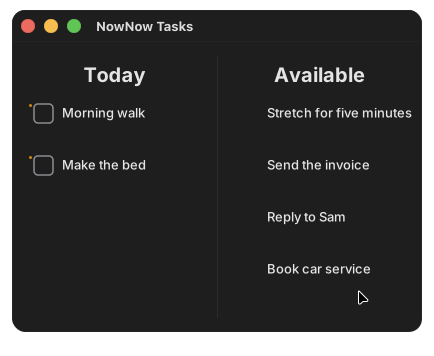
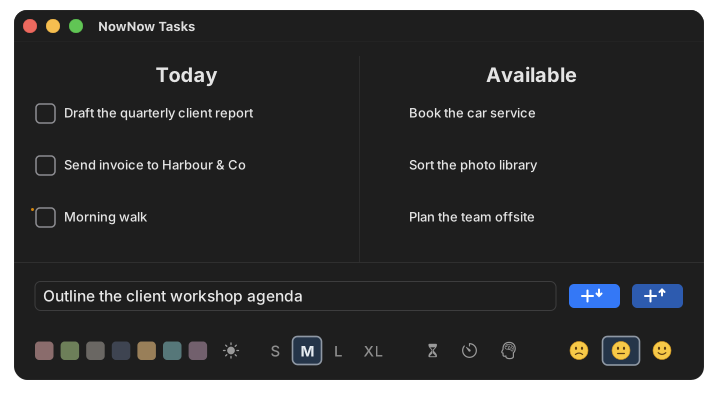
The NowNow Tasks window with Today and Available lists above the task composer, where the Standard, Tomato and Deep Work buttons are selected in turn.

Be one of the first to try NowNow on the task you’ve had trouble starting.

Finish more of what you start.

Progress is a process. You sketch the plan, you start the work, and you let NowNow worry about what’s next.

Tasks stall or something else takes over.

Either way, what you were trying to finish gets left behind, and that can weigh on you.

You don’t need a judge, you need a reminder.

NowNow pays attention to timing and task size and checks in when your progress may have stalled.

You can change tasks without losing track.

If something else grabbed your attention, it’s easy to switch while NowNow handles all the admin. Nothing gets lost and you’re now making progress on multiple fronts.

You’re not lazy. You’re stuck and no-one’s coming to help.

We get stuck. NowNow takes the effort out of getting unstuck. Some people don’t understand the hardest step is switching to your to-do list. We do.

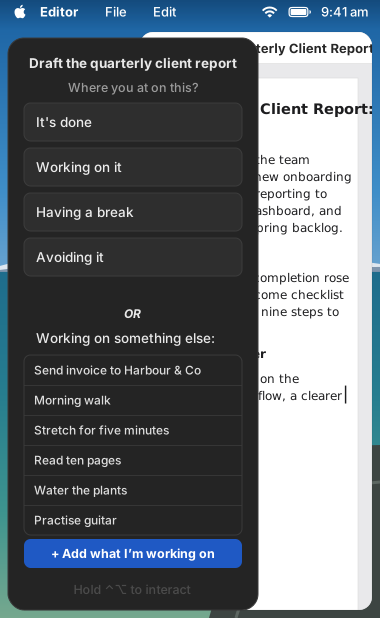
If a task goes on much longer than you planned, NowNow checks in.

Self-awareness is key. So is making it painless to move between tasks, and guilt-free to enjoy a break.

A NowNow check-in in the corner of a Mac screen over a report, asking Where you at on this?

Pick something you keep meaning to finish, and start it the day NowNow launches.

Give your life the time it deserves.

NowNow helps you put your hours where they matter: the people, interests and work you actually care about.

Work takes whatever time you don’t protect.

Your choices need to support your life as it actually is, including the parts that are important to you.

Your people get time that’s theirs.

When it comes round, NowNow brings up what you planned together.

Your interests get proper time, too.

Hobbies and projects you remember as you climb into bed can have their own time in your week.

When you want to be left alone, NowNow goes quiet.

Life gets its own time, and outside it NowNow can stay out of your way.

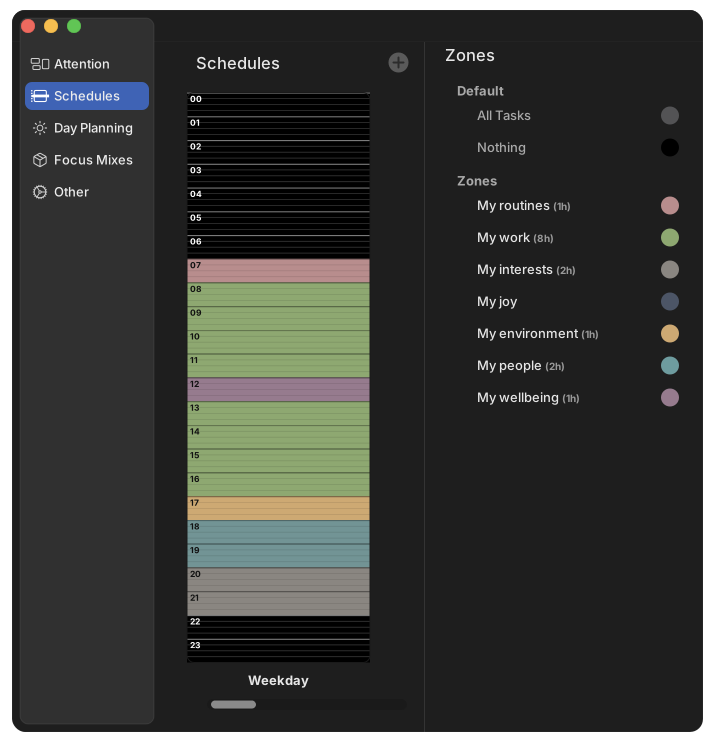
When your schedule says it’s time for family, a hobby or work, NowNow brings up the activities that you planned for it.

NowNow Preferences showing Schedules: a weekday painted in coloured bands for routines, work, people and interests.

Set aside one evening this week for yourself.

Live the day you meant to live.

Set your intentions for the day, and NowNow helps you fulfil them.

Unfinished tasks don’t have to carry over.

Lists only grow, and one off day can undo a system you built. Every day starts clean, if you want it to.

You choose what comes back.

Anything you don’t bring back is kept until you want it.

Your daily habits and rituals are already there.

The walk, the stretch, the ten pages: set them once and they’re on the list each day, so there’s nothing to remember.

No streaks to break.

Miss a day and there’s nothing to make up.

Each new day can start with your daily habits back on the list, ready to be ticked off.

The NowNow Tasks window. The pointer moves Stretch for five minutes from Available to the bottom of the Today list, then Reply to Sam after it.

Turn your chaotic morning into a calming ritual.

There is only one perfect strategy.

That perfect strategy is taking a break and then starting again. And the only skills you need to practise are self-forgiveness and picking up where you left off.

Questions

Is NowNow a task manager for Mac?

You can use it as a simple task list, but its real job is helping you finish. NowNow keeps the one task you chose in view and nudges you back to it at intervals you set.

Is NowNow free?

It will be. When NowNow launches, tasks, nudges, check-ins, Pomodoro and Deep Work sessions and day planning will all be free, with no limits. An optional monthly subscription will add a fresh Focus Mix of images and sounds about every two weeks.

Can NowNow help with ADHD?

NowNow is built for people who drift, stall or over-focus, which many people with ADHD know well. It gives you an outside nudge back to the task you chose, at intervals you set. It isn’t a treatment.

Can NowNow help me stop hyperfixating?

It can help. Give a task the time you think it needs. If you stay on it well past that, NowNow’s nudges get bolder and harder to ignore, so you can decide whether to keep going or move on.

Is NowNow a website blocker?

No. Nothing gets locked or blocked, and you stay in charge of what you do. Instead of shutting distractions out, NowNow keeps bringing you back to the task you chose.

Does NowNow have a Pomodoro timer?

Yes. Any task can run as a Pomodoro, with a set work time and a break, or as a Deep Work session, with a minimum time and no upper limit. You choose the lengths.

Which Macs does NowNow run on?

NowNow runs on macOS 15 or later. There’s no system to set up first. Type one task and you’re going.

Keep the promises you make to yourself.

The big ones, the small ones, and the ones just for you.

Get notified when NowNow launches

NowNow for Mac isn't out yet. Leave your email address and we'll tell you the day it launches.

We'll use your email address only once, to send you the launch email. Then we'll delete it. How we handle it